
Settings, passkeys and notifications
Settings is one scrolling page of sections: how we show your numbers, what we send you, and how your account works. The line under Units is the one worth reading first. Those are display preferences, and we always store your recipes in canonical units: kilograms, liters, Celsius and specific gravity, so nothing you change there can move a number.
Two of the sections below are not display preferences, and they do move a number. Salts you stock, under Water salts and acids, is the shortlist the water panel’s Suggest additions weighs out of while your inventory holds no salts, so unticking a bag there changes the grams it proposes. And the starter lead time under Calendar moves the date we put your starter on.
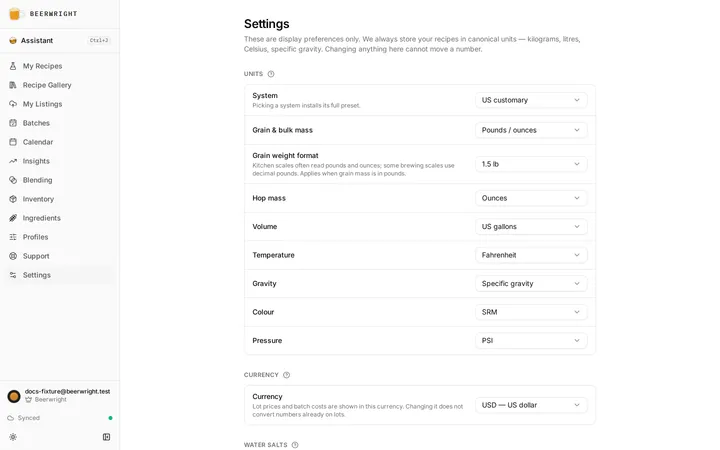
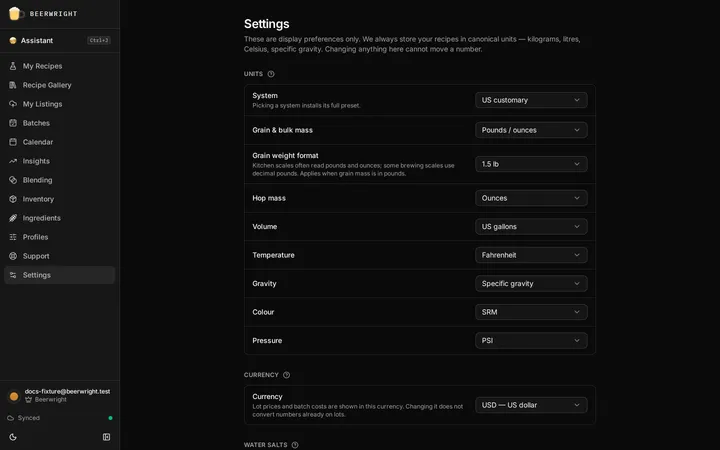
System installs a full preset, Metric or US customary. Below it, each kind of measurement has its own choice: grain mass, hop mass, volume, temperature, gravity in SG, Plato or Brix, color in SRM or EBC, and pressure in psi, bar or kPa. Grain weight format chooses between “1.5 lb” and “1 lb 8 oz”, because kitchen scales and brewing scales read differently.
Pick US and then set temperature back to Celsius and the system shows Mixed.
Currency, salts and acids
Section titled “Currency, salts and acids”Currency is what lot prices and batch costs are shown in. Changing it does not convert the numbers already on your lots.
Salts you stock is the list the water panel’s Suggest additions reaches for while your inventory holds no salts. Stock one there and the suggestion follows your cupboard instead, weighing out of the salts you actually have. The water panel says which of the two it is using, and names the salts when it is reading your inventory.
Chalk, slaked lime and anhydrous calcium chloride start off: chalk barely dissolves, slaked lime overshoots in careless hands, and shops sell the dihydrate. Turn them on if they are what you have. These three are the exception to the cupboard rule, so a bag of one in your inventory is not enough on its own. You cannot untick the last salt on the list, because a solver with nothing to reach for is a broken button.
Acids you stock does the same for the mash and kettle pH pickers, and does one thing more: the first acid on your list is the one a picker opens on, so if you only ever buy phosphoric you stop picking it on every recipe. Hydrochloric and sulfuric start off — the chemistry is sound and a few brewers use them, but they are not what a homebrew shop hands you. Acidulated malt is always offered whatever you tick, because it goes in the grist rather than the water. The last acid will not untick either.
Calendar
Section titled “Calendar”Starter sets how far ahead of brew day we put Starter on your calendar, from one to five days. Two is the default and suits a stirred starter, which has dropped clear by then; the day before suits one you pitch at high krausen. Change it and every planned starter moves, and the reminder email follows.
Appearance
Section titled “Appearance”Theme follows the system, or is light or dark.
Account
Section titled “Account”Signed out, this section says your workspace is saved on this device and offers Sign in. Signed in, it shows the address you signed in with and the sections below open up.
Display name and Picture are your public profile. The name is checked when you press Save, not as you type, and if somebody already has it we say so then.
Plan shows what you are on and the assistant messages it includes, with Upgrade or Manage billing beside it. Have a code? takes a trial code. The plans page covers all of that.
Sync says where your changes are: on this device only, on their way, on the server, or queued until the connection returns. Session signs you out, which returns this device to its local-only workspace.
Delete account erases your workspace, your recipes and the account, on the server and on this device. You type your email address to confirm, and it cannot be undone. Export your data first; the section for that is below.
Sign-in
Section titled “Sign-in”A passkey is an extra way in, never the only one. A sign-in link to your email address always works, so removing every passkey is safe.
Press Add a passkey and your device makes a key it keeps to itself and gives this account the public half. There is nothing to remember and nothing to type. There is no name field; the browser names it after the device or the keychain it lives in, and the row says when it was added and whether it is synced. Remove asks once, in place.
Adding a passkey needs a recent sign-in. If you have been signed in for more than a day, the page asks you to sign out and back in first. A browser that cannot make passkeys says so instead of showing a button that would only refuse you.
Fermentation devices
Section titled “Fermentation devices”This is where a Tilt, RAPT Pill or iSpindel gets the URL it posts to. It needs an account, and live fermentation charts are a paid feature, though devices you added before keep recording. The fermentation devices page walks through each device. What lives here: Add a device, up to ten of them, each with its secret URL, a choice of which batch its readings go to, and Revoke. Below the devices, any readings that arrived with no batch fermenting wait under Unclaimed readings until you move them to a batch or delete them.
Notifications
Section titled “Notifications”Two emails, both off until you turn them on, and neither depends on your plan.
Fermentation alerts. We email you when a batch stops dropping in gravity for three days, and again when it holds the same gravity for two. We send each at most once per batch. You need a device posting readings; without one there is nothing for us to watch.
Batch reminders. We email you the evening before your calendar has something on it, a dry hop, a transfer, a packaging day — and a cellar action you put on a blend, which is the only kind of date a blend has. The reminder follows the beer’s own schedule, so if you move a date, it moves too, and the link opens the batch or the blend it is about.
Both are a nudge, the beer’s own name, and a link. Nothing else you wrote goes in one: no recipe name, no fermentation step, no gravity, no blend components, no notes. The name is there because a reminder that will not say which beer is not one you can act on. Nobody reads replies to the address they come from.
Export all data puts every recipe, equipment profile, water profile and setting into one JSON file this app can read back. It is built in your browser and nothing is uploaded. It works signed out, because a guest’s workspace is a full workspace and you are entitled to take it with you.
The rest of the section is for the curious: the ingredient catalog version, the engine versions, the style guideline we use, and whether your storage is local only or local and synced. Recipes snapshot ingredient values when they are added, so updating the catalog never moves an existing recipe’s vitals.
Related
Section titled “Related”- Your profile, for the display name and picture.
- Plans, billing and trial codes.
- Offline, for what the sync states mean in practice.
Something wrong on this page? Tell us.