
Blending
Blending is for the beers that are made in the cellar rather than the kettle: a gueuze from three lambics, a barrel-aged stout cut with a young one, a sour with fruit on it. Each session records a blend you made and carries its maths, so you can answer the questions a blend raises before you bottle it. How much CO₂ is already in it? How much will it keep making on its own? What do I prime with, and will the yeast survive the acid?
A session
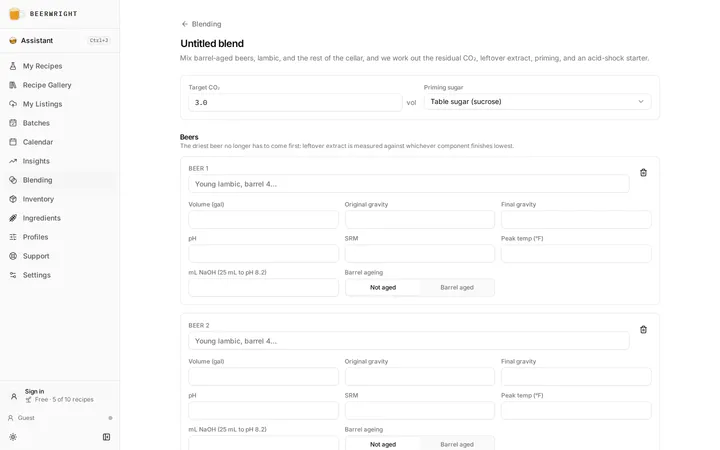
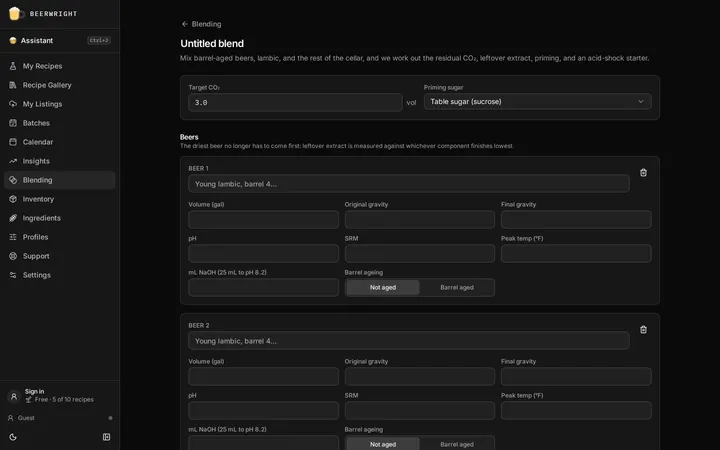
Section titled “A session”Press New blend and the session opens with nothing in it. Name the blend at the top, then put the beers in. Add from a batch… fills a card from one of your batches, Add from a blend… fills one from another session, and Add beer gives you a blank card to type. Sessions are listed by name and by last update, searchable by name, beer or addition.
The free plan includes five sessions; the paid plans have no cap. If you are at the limit, a new blend is not saved, and the app says so and suggests deleting one you no longer need or moving up.
The page follows the blend through its stages, with one card for each. The Blending card holds the beers and anything you put in with them, and it is open while the session is Planned or Blended. The Conditioning card holds your hydrometer readings, and it opens once the blend is Conditioning. The Packaging card holds the bottling-day questions, and it opens once the blend is Packaged. A card you are not using folds down to a line saying what is in it, so the Packaging line tells you the dose while you are still conditioning. You can open any card at any stage. The results sit under the cards and never fold, so the numbers are always a short scroll from whatever you are typing.
Stages
Section titled “Stages”A session says where the blend is. It starts Planned, while you are still working out what goes in. Blended is the day the beers go together, Conditioning covers the weeks in bottle or barrel afterwards, and Packaged is when it is finished. Tap a stage on the tracker at the top of the page to move the session, forwards or back.
The first time you reach Blended, Conditioning or Packaged, we stamp that stage with today’s date and show it under the tracker. After that the date is yours: type a different one if you are catching up on a blend you made last month, or clear it if you tapped a day too soon. Stepping back a stage leaves every date where it is, because tapping Conditioning has not un-packaged anything. Planned carries no date of its own, since the day you planned the blend is the day you made the session.
When you are done with a session, Archive it from its row menu in the blending list. It stays in the list with an Archived stage, and the Archived chip narrows the list to everything you have filed away, so a blend you archived is still one you can search for and read. Unarchive brings a session back to the last stage it has a date for, and back to Planned if you never dated one.
What is still owed
Section titled “What is still owed”A barrel runs on dated jobs nothing can work out for you: pull the oak cubes, rack off the cherries, taste it in a month. Put one on a day from the calendar — press Schedule, choose the blend under Blends, and give it a kind, a title, a date and any note.
Once a blend has one, Next steps appears under the stage tracker and lists what is still owed, with the day and how far off it is. Press Done to tick one off, from here or from the calendar — it is the same tick, and it is the same tick a batch gets. Nothing scheduled means no panel, because a heading over an empty list would be the page asking you to explain yourself.
A day that has gone by stays on the list and turns amber rather than disappearing, and the same chore shows up under Overdue on the calendar until you tick it or move it. Once the blend is Packaged or archived it stops asking. Your phone’s calendar gets these too, if you have subscribed, and so does the nightly reminder email if you have that switched on.
The beers
Section titled “The beers”Each card is one component: a name, a volume, its original and final gravity, its pH, its color, the warmest it got after fermentation, and whether it was barrel aged. Add from a batch… fills a card from one of your batches: the packaged volume, the measured gravities where you took them and the predicted ones where you did not, the color and the peak temperature. The pH and the acid figure are yours to add, because the batch does not know them.
Add from a blend… does the same from another session. A blend is a beer once you have made it, so we copy what that session came to: its gravities, its color, its pH, the warmest temperature any beer in it reached, and barrel ageing if any of them was aged. The volume we copy is the whole session, and you edit it down to what you actually drew off, the same way you edit a batch’s volume down to what you poured. The numbers are a copy taken the moment you add the card, so the blend you already bottled does not move when you top the barrel up again. If the session you pulled from changes afterwards, the card tells you and offers its new gravities.
The card shows the beer’s ABV, its titratable acidity, the residual CO₂ it holds, and its color, and the header says what share of the blend it is.
A barrel, one blend at a time
Section titled “A barrel, one blend at a time”A barrel is a blend that keeps changing, and you can keep it here as a chain of sessions.
Start with a session for what is in the barrel now: one card per beer that went in. That session is the barrel’s contents, and its ABV is the barrel’s ABV.
When you draw beer off to bottle it, make a session for the bottling and Add from a blend… the barrel into it. Type the volume you pulled over the total we copied, then add whatever else goes in the bottle: the other beers you are blending with, and fruit, herbs or a tincture as rows of their own. That session is the beer you bottled, and it keeps its own carbonation answer.
When you refill the barrel, make a new session for what is in it afterwards: the old contents as one card, the fresh batch as another, and the top-up as a third. The old contents card is the barrel’s previous session with the volume you left in it. We cannot know how much beer is still in the wood, so that number is yours to type. Name the sessions by the date of the barrel day and you have the barrel’s history, each one saying what it came out at.
The mL NaOH field is for a titration: 25 mL of the beer titrated to pH 8.2 with 0.1 N sodium hydroxide. It is the one measurement that turns “sour” into a number, and it feeds the acidity figures below.
Splitting two beers for a target
Section titled “Splitting two beers for a target”With exactly two beers in the session and a strength on each, Split for a target… appears under the cards. It asks the question the other way round: instead of here is the mix, what does it come to, it answers here is the strength I want, how much of each do I pour.
Say the ABV you are aiming for and how much blend you want — we start you between the two beers, and at the keg volume if you have set one, or at what the cards add up to if you have not. The two volumes appear below, and Apply writes them onto the cards, which you can undo in one step if you were only looking.
A target outside the two beers cannot be reached by blending them, however you pour: two lambics at 5 % and 7 % make nothing at 8 %. We say so instead of answering, and the same goes for two beers that are already the same strength, where any proportion hits the target and none of them is the answer to “how much of each”.
Three beers or more and the action is not there, because the square is arithmetic over two values and three shares are not decided by one target. The Pearson square block in a journal takes any two numbers you like, which is what to reach for when you are splitting a pair at a time.
What you measured
Section titled “What you measured”Every time you float a hydrometer in the blend, record it under What you measured in the Conditioning card: the gravity, and the day you took it. Press Record another reading for each one after that.
It is worth doing even once, because without a reading the page is describing two different beers at once. The final gravity it shows you is the average of the beers you poured in — the blend on the afternoon of the buckets — while the carbonation and the ABV beside it describe the same vessel months later, after the bugs have worked through everything sweeter than the driest component. Both are honest guesses. Only a reading says which one is in front of you.
Keep taking them and the list becomes the more useful thing. A gravity going 1.012, then 1.008, then 1.004 across a winter is a culture still working; the same number three times is one that has stopped. That is worth knowing before you decide anything about bottles, and it is not something a single stored number can tell you.
The figures below the section come from the newest reading, which is the beer you actually have — the row it is using says so. We read the ABV off it, and we stop promising carbonation from extract that has already fermented. If your blend dried out to the floor in the vessel rather than in the bottle, that CO₂ went out through the airlock, and the priming dose has to carry the whole target instead of half of it. The average of the beers you poured in stays on screen beside it, so you can see the gap.
What the blend comes to
Section titled “What the blend comes to”The results card gives the blend’s total volume, ABV, final gravity, pH, acidity, color, and two carbonation figures: the residual CO₂ the blend holds now, and what it will reach without sugar.
That second figure is the one the spreadsheets get wrong. A blend keeps fermenting in the bottle toward the driest component’s final gravity, and the leftover extract in the sweeter beers becomes CO₂. We measure that against whichever component finishes lowest, wherever it sits in the list, so the driest beer no longer has to come first.
Packaging
Section titled “Packaging”Everything you decide on bottling day is in the Packaging card. It stays folded until the blend is Packaged, because you may want to put three beers together and leave them alone for a year before you think about bottles. Folded, it still shows your target and the dose, and you can open it yourself at any stage.
Target CO₂ is how lively you want the beer, and a new session starts at three volumes with table sugar, because mixed-fermentation beer is usually bottled that way. Change either one here.
Priming is the sugar to add to close the gap between what the blend will make on its own and the target. If the leftover extract already meets the target, there is no sugar, and we say so. We need a volume and a peak temperature on each beer before we can give you a dose at all.
The acid-shock starter is the yeast to add so the bottles actually carbonate. Yeast dropped straight into a pH 3.3 blend mostly dies. We give you the dry yeast to use, and the water and the acid beer to wake it in, equal parts, a day or two before packaging, so the yeast acclimates to the pH before it meets the whole blend.
The keg volume splits the blend into what goes on tap and what goes in bottles, and we count what is left for you in the bottle sizes brewers actually fill, the 750 mL among them. Which sizes we list follows the units you have set, so the count is in the bottles on your own shelf.
Additions
Section titled “Additions”Anything that goes into the blend and is not a beer gets a row of its own: a bucket of cherries, a jar of honey, a handful of coriander, a dry hop, a vanilla tincture. Say what kind the row is and it asks you for the numbers that kind has, and for nothing else.
Fruit is cherries, raspberries, a jug of juice, and it asks you for whichever of the two you actually have. By juice is the carton or the pressed juice: give us the amount and the gravity, and we tell you how much sugar it carries and what the blend’s ABV would be if all of that sugar ferments out. By weight is the bucket of whole fruit you tipped in, which came with no gravity and is never going to have one. Weigh it, name the fruit, and we fill in how much of that weight is sugar. The figure is the typical one USDA publishes for that fruit, rounded, and it is a starting point rather than a verdict: if you know your fruit is sweeter than that, type over it and we use your number. Pick Other for a variety the list does not name and the percent stays yours.
Whole fruit adds no volume to the blend. The skins, stones and pulp stay behind in the fermenter, and what the sugar does is raise the gravity of the beer that is already in there.
Sugar or honey is a jar of honey, a tin of maple syrup, table sugar. This one is weighed rather than poured, in the same kilograms or pounds you buy grain in, and you name which sugar it is from the same list the priming dose uses. The name is what tells us how much of that weight ferments, so there is no gravity to read: a kilo of honey is not a kilo of table sugar.
Herb, spice or oak is coriander, a vanilla pod, oak cubes, a handful of coffee. It takes a weight and nothing else, because it changes what the beer tastes like rather than what it measures. The row is there so the blend’s record says what actually went in it.
Hops is the same weight with the catalog behind the name. Press Find a variety and search all 225 of them rather than trying to remember how Hallertauer Mittelfrüh is spelled — and if what you have is a bine off a neighbor’s fence or this year’s numbered experimental, the name box is still yours to type in.
A hop on finished beer contributes no bitterness, and that is not us rounding down: there is no boil left for the alpha acid to isomerise in, so every one of our IBU models returns zero for it. That is why the row does not ask for an alpha acid — it would be a number nothing reads. Record when it went in and when you pulled it, and the weight, and the blend’s record has what you will want next time.
Hops do soak up beer and keep it — six milliliters a gram is the usual figure, so a hundred grams in twenty liters is most of a bottle. We do not take that off your volume or your bottle count, because no addition does. Worth knowing when you count bottles.
Tincture or spirit is a tincture, a brandy, anything you pour in by the bottle. Give us the volume and its strength, and we count that alcohol in the blend’s ABV straight away. Unlike the sugar in fruit or honey, it is not waiting on the yeast to become alcohol.
None of them changes the total volume or the bottle count.
When it went in
Section titled “When it went in”Every row takes two days as well: when the addition went in, and when it came out. Fill in Went in and we can answer the question the page used to hand back to you.
The sugar in fruit and honey ferments, and how much of it is left when you cap the bottles depends entirely on when it went in. Tip cherries in a month before packaging and the yeast has had them: that sugar is alcohol, and your priming dose is right as it stands. Tip them in the week before bottling and it is still sugar — priming sugar, sitting in the bottle alongside whatever you add on top. That is how fruit beers gush.
So a row that went in less than three weeks before your packaging date counts as sugar still to ferment: we say how much, and we take it off the dose to make room. Three weeks is a judgment and a cautious one — a cold cellar and a slow culture can take longer — so treat it as a warning worth acting on rather than a promise.
Leave the days blank and nothing changes: the sugar stays out of the dose and the call stays yours, exactly as before. The date is what buys you the answer.
Came out changes no number anywhere. It is there because two days on a dry hop is the thing you want to know the next time you reach for that hop, and the blend’s record is where you will look for it.
Feedback
Section titled “Feedback”A blend collects tasting sheets the way a batch does. Feedback in the session header opens a page of its own, where every sheet somebody sent about this blend lands, along with any competition sheets you added from a photograph. When sheets have arrived that you have not read yet, the button carries the count.
Print labels, beside it, gives you a sheet of thirty bottle labels for the blend, and Print a card on the Feedback page gives you tasting cards to tie to the bottles instead. Either way the code opens the same short form a batch’s does, and what a blend’s card says is its name, the word Blend and its strength, since a blend has no style to print. See tasting feedback for the forms people fill in, and for reading a competition sheet from a photograph.
Sharing a session
Section titled “Sharing a session”Share in the session header makes one link that opens this blend on a page anybody can read, for a forum thread, a bottle swap, or whoever you handed a bottle to. What they get is your notes, the days you blended and packaged it, the beers with their gravities, the additions and when they went in, and what the blend comes to, in whichever units they prefer. The page keeps up with the session, so a barrel you topped up this afternoon has moved by the time they open it. The batches and sessions your beers came from are names on that page rather than links. Stop sharing in the same dialog ends it. See sharing for what a link is and how to take one back.
Journals
Section titled “Journals”Beside the session’s name, Beerwright lists the journals written about this blend, and Start a journal begins one. It opens on a new page carrying a Blend block for this session: the beers that went in with their volumes and final gravities, and what came out. Nothing is copied, so a beer you top up here moves the figures there too.
Once you keep a journal, Add to a journal… beside it puts this session on a page you already have. That is how a barrel stays one story: pick the barrel’s journal and the Blend block joins the brews that filled it.
That is the other half of the link a batch card already makes. A batch says which blends it went into; a blend says which journals were written about it. A journal about a barrel can carry the brews that filled it and the blends that came out of it on one page.
Where the maths comes from
Section titled “Where the maths comes from”Residual CO₂ follows Michael Tonsmeire’s priming spreadsheet, and a barrel-aged beer is assumed to have lost half of it, which is his anecdotal factor. Titratable acidity, the blend’s pH, the carbonation from leftover extract and the acid-shock starter follow Crane’s blending calculator from Council Brewing, as presented at the National Homebrewers Conference. The pH blending is exact for strong acids and an approximation for buffered beer; components with no pH entered are skipped rather than treated as water. The footer of every session says the same.
Related
Section titled “Related”- Brew day and batches, for the batches a card comes from.
- The calendar, where a blend’s cellar actions go on a day.
- Packaging and carbonation, for priming a single beer.
- Plans, for the session limit.
- Journal, for writing a blend up as it ages.
- Tasting feedback, for the sheets people send about a blend.
- Sharing, for the link that opens a session for somebody else.
Something wrong on this page? Tell us.