
Recipe history and versions
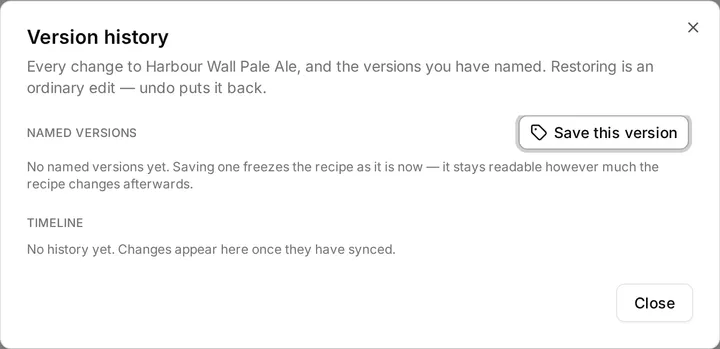
Every recipe keeps two kinds of history. The timeline is every change, in order, with the assistant’s changes marked. Named versions are the ones you decided to keep: “brewed as v3”, “before the hop rework”. Both live behind Version history… in the recipe’s overflow menu.
The timeline
Section titled “The timeline”The timeline lists each change with the same one-line summary the editor uses, newest first, and a badge on the ones the assistant made. It comes from the change log your workspace already keeps for syncing, which is why it costs nothing to have. It is also why it has limits: it keeps the last fifty changes to a recipe, and it needs a connection to read. Offline, or on a workspace that has never synced, the timeline is simply empty and the editor works as before.
Any point on it has three actions. Compare shows what changed between then and now. Restore puts the recipe back to that point. Name version freezes that point as a named version, which is how anything worth keeping outlives the fifty-change window.
Named versions
Section titled “Named versions”Save this version freezes the recipe as it stands now. A named version is a whole copy of the recipe, not a pointer into the timeline, so editing the recipe afterwards cannot move a single number inside it. That is the whole reason “brewed as v3” means anything. Named versions are stored with your workspace, so they are there offline and on every device.
The default name carries the date and the time, because several versions of one recipe are routinely saved on the same day. Rename with the pencil, delete with the bin. A recipe can hold twenty-five named versions; each is a full recipe document, and the timeline covers the rest.
Deleting a recipe leaves its named versions in place, so a recipe you regret deleting is still restorable.
Comparing
Section titled “Comparing”Compare on either kind of version opens a diff against the recipe as it stands: what was added, removed or changed, with the vitals before and after. Restore this version is at the bottom of it.
What restoring does
Section titled “What restoring does”Restoring is an ordinary edit: it writes the old recipe over the current one as one change, which gives you three things you would want. Undo puts it back, it syncs to your other devices like any other edit, and it appears on the timeline as its own entry, “Revert recipe to …”, so the history is never rewritten, only extended. Rolling back only ever appends.
The recipe keeps its identity and its creation date; everything else comes from the version you chose.
Related
Section titled “Related”- The recipe editor, for the overflow menu.
- The assistant, whose changes the timeline marks.
- Offline, for why the timeline needs a connection and named versions do not.
Something wrong on this page? Tell us.