
Plans, billing and trial codes
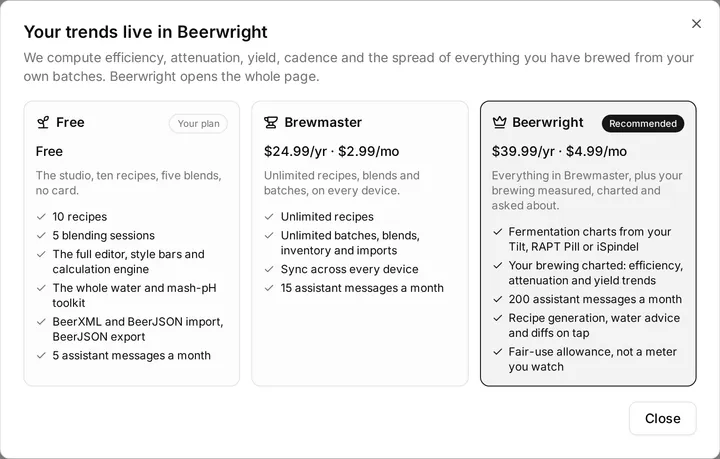
We have three tiers. The free one is a working product rather than a trial, Brewmaster removes the caps, and Beerwright adds the two features built around measurement — fermentation charts and Insights — plus the assistant as a daily tool.
What each tier includes
Section titled “What each tier includes”It asks for no card, and it never expires.
- 10 recipes
- 5 blending sessions
- 5 journals
- The full editor, style bars and calculation engine
- The whole water and mash-pH toolkit
- BeerXML and BeerJSON import, BeerJSON export
- 5 assistant messages a month
The studio itself — the editor, the water and mash-pH tools, brew day, batches, inventory, the blending tool, journals, import and export — is in the free tier. What is capped is how many documents you keep and how much of the assistant you use.
Brewmaster — $24.99/yr · $2.99/mo
Section titled “Brewmaster — $24.99/yr · $2.99/mo”- Unlimited recipes
- Unlimited blends
- Unlimited journals
- 15 assistant messages a month
Beerwright — $39.99/yr · $4.99/mo
Section titled “Beerwright — $39.99/yr · $4.99/mo”- Fermentation charts from a Tilt, RAPT Pill or iSpindel
- Insights — efficiency, attenuation and yield trends over your own batches
- 200 assistant messages a month
- Recipe generation, water advice and diffs on tap
- A fair-use allowance, not a meter you watch
Everything in Brewmaster is in Beerwright too. If what you want is the assistant as a daily tool, or your fermentations and your brewing history charted, that is the Beerwright tier and the app will say so rather than upselling you from a recipe cap.
Fermentation charts and Insights
Section titled “Fermentation charts and Insights”These two are Beerwright features, and both are gentle about it.
Fermentation charts. A device posts to a secret URL that names your account. Minting that URL and drawing the chart need Beerwright; the posting itself never checks a plan at all. So a device that is already running keeps recording through a downgrade, a lapsed trial code or a failed payment, and every reading is kept. What you lose is the picture, and it is all there — with no gap in the middle — the moment the plan comes back.
Insights. The whole page is arithmetic over your own batches, in your own browser, and it is reachable on every plan including signed out. The brewhouse-efficiency trend is live for everybody, because that is the panel that tells you which measurement to take next. The other six are drawn from sample data with a lock on them until you are on Beerwright.
The assistant allowance
Section titled “The assistant allowance”The count is per calendar month and resets at midnight UTC on the 1st, the same moment for everybody. Nothing is prorated and there is no per-account anniversary.
When it runs out the assistant says exactly what happened and when it comes back, and points out that nothing else has changed:
Everything else in Beerwright is untouched — the editor, the water tools and your recipes all still work.
The sidebar only shows a usage meter when the allowance is one you are paying for — Brewmaster or Beerwright — and only past halfway. A permanent counter on the free tier would read as a countdown to a paywall, so there is not one.
Buying, and managing a subscription
Section titled “Buying, and managing a subscription”Payment is handled by Paddle, who are the merchant of record. The checkout opens as an overlay inside the app rather than sending you to another site, and it is themed to whichever mode you are in.
Once the payment lands, the cap lifts in place — no reload, no sign-out. If Paddle’s confirmation reaches the app before the receipt is fully processed you will briefly see “Payment received — activating your plan…”, and then it is done.
Afterwards, Settings → Account → Plan carries a Manage billing button. It opens Paddle’s own customer portal in a new tab, which is where cards, invoices, tax details and cancellation live.
Canceling does not take effect immediately: the plan reverts to Free when the period you have paid for actually ends. A failed payment does not drop you either — the plan is held through Paddle’s retry cycle rather than cut off on the first decline.
Trial codes
Section titled “Trial codes”A trial code puts an account on a paid plan for a number of calendar months. It is deliberately not a card-on-file trial: there is nothing to cancel, and it does not convert into a subscription by itself.
Switching mid-subscription? We count the time you paid for
Section titled “Switching mid-subscription? We count the time you paid for”If you are switching from another brewing app with months left on a subscription you already paid, send us the receipt. Brewfather, BeerSmith and Brewer’s Friend are the ones we see most, and the offer is not limited to them: any brewing subscription you have not finished counts. A screenshot in a support conversation works, and so does email. We issue a trial code that runs your account on Brewmaster until your old subscription would have expired, up to twelve months. When it runs out, you decide whether we earned the renewal.
Codes look like BW-XXXX-XXXX-XXXX-XXXX. Redeem one in Settings → Account,
under Have a code?. The app’s own description of what you are getting:
A trial code puts this account on a paid plan for a few months. It lapses back to Free when it runs out — there is no card and nothing to cancel.
On success you are told when it ends, in months rather than to the minute: Yours until March 2027, then back to Free unless you subscribe. That date is shown on the Settings plan row for as long as the code is running. It is kept out of the sidebar, where it would turn a status line into a countdown.
A code that does not work gets one message — “That code isn’t valid.” — whether it is unknown, already used by you, or out of uses. That is for your privacy as much as ours: a more specific error would be a way to test guessed codes.
When a trial lapses
Section titled “When a trial lapses”Nothing happens to the account, and nothing happens on a schedule. The plan is resolved every time it is read, so an expired code simply reads as the free tier from the moment it expires. See below for what that means in practice.
If you subscribe part-way through a trial, the expiry is cleared: you are on a paid plan, not a paid plan with a countdown still attached.
What happens when a plan ends
Section titled “What happens when a plan ends”Nothing you have made is deleted or taken away.
The caps are enforced at one point — when you try to create a new recipe, a new blend or a new journal. We leave everything else untouched. So an account with 15 recipes that drops to Free keeps all 15, can open and edit all 15, can export all 15, and simply cannot add a sixteenth until it is back under the cap or back on a paid plan.
Archiving does not help here, and the message says so. It is the obvious thing to reach for at the cap — it clears the list, so it feels like it should clear the count — but an archived recipe is one you still have.
You find out at the moment it matters rather than in advance: the new recipe appears, the server declines it, and it rolls back with a message saying which plan you are on and what the limit is. That is one code path rather than two, and the one that runs is the authoritative one.
The same rule holds for a refund or a chargeback, and for a subscription that is canceled: the entitlement returns to Free, and the workspace does not change.
Fermentation readings are the same rule seen from the device’s side: they keep arriving and they keep being stored, whatever the plan says. Insights keeps computing too — the efficiency panel stays live, and the rest go back behind the lock.
Importing more recipes than will fit
Section titled “Importing more recipes than will fit”The import dialog checks the cap before it starts rather than after, so it can tell you that a file with forty recipes in it will contribute three. See Importing recipes.
Related
Section titled “Related”- Settings, for where billing lives in the app.
- Insights and Fermentation devices, the two features a plan unlocks.
- Support, if a payment or a code has gone wrong.
Something wrong on this page? Tell us.