
Inventory and shopping
Inventory is what you have on the shelf, lot by lot. It is optional, and the app works perfectly without it. Keep it and it earns its keep in four places: every recipe gains a “can I brew this?” check, the shopping list becomes the difference between the recipe and the cupboard, a batch gets a cost, and brew day can take the ingredients out in one press.
The cupboard
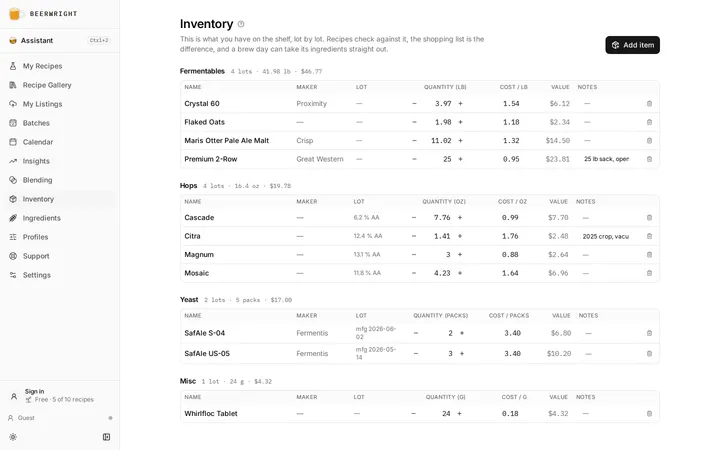
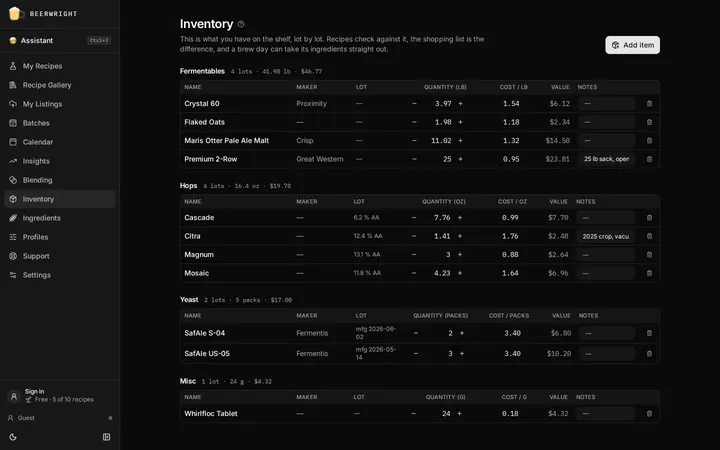
Section titled “The cupboard”The page lists your lots by kind: fermentables, hops, yeast, misc. Each group counts the lots it still holds something of, and shows the total quantity and the total value where the lots carry prices. A row is one lot: the name, the maker, what makes the lot a lot, the quantity, the cost per unit, and your notes.
We keep lots separate on purpose. Two sacks of the same malt bought at different prices are two lots, because that is what they are, and it is the only way a cost figure can be right. What makes a lot distinct is the three things you can set on it and nothing else: a hop’s alpha acid off the bag, a yeast’s manufacture date, and what you paid. We never guess any of them.
Quantities are stored in grams, and packs for yeast, and shown in your units. An inventory row is a number a human types off a scale, so that is what it holds.
Adding a lot
Section titled “Adding a lot”Press Add item, or Add to inventory on any ingredient’s record on the ingredients page. Search the catalog for the ingredient, then fill in the lot: the quantity, and optionally a hop’s alpha, a yeast’s manufacture date, what you paid for the whole sack or pack, and a note for the supplier or where it is stored.
What you paid is stored as a cost per unit, so the value of the sack goes down as you use it rather than vanishing the first time you open it.
Bought on is worth filling in on anything. The lot then says how long ago it arrived — “bought 14 months ago” — and that is all it says: we do not publish a shelf life for a malt and will not invent one, because you know better than we do what fourteen months means for crushed grain against a sealed sack. It also fixes the order stock is used in. Lots are consumed oldest first, and without a purchase date “oldest” can only mean the row you typed first, which is the wrong answer for a sack that sat in the garage before you ever tracked it.
Hops take a crop year as well, and that one does arithmetic. See adjusting a hop for age.
Your own ingredients are in that search too, under Yours, so anything you have already defined is one press away.
If the search has neither, type the name and it offers you two things. Add it to your ingredients opens the spec form, and once you have filled it in the lot is joined to it and every recipe can use it. Quantity only stocks it without a spec: we count it in your cupboard and no recipe can use it, which is what you want for a bottle of StarSan and not much else. We never write the spec for you behind a tick box, because a fermentable’s color and a hop’s alpha are numbers you should see and correct, not numbers we should invent.
Importing from another app
Section titled “Importing from another app”If you already counted your stock in another app, you can bring it across instead of typing it again. Import beside Add item takes Brewfather’s inventory export, a BeerXML or BeerJSON ingredient list from BeerSmith or Brewer’s Friend, or a spreadsheet saved as CSV. We read the file on your device and show you everything before anything is added.
For a spreadsheet, we guess which column is which and show you our guess first. A name and an amount are all we need. If there’s no type column, you tell us what the whole file is, and the same goes for units.
In the preview, each row says whether it matched our catalog or comes in as a one-off, exactly as if you’d typed it. Anything you already have a lot of is marked and left unticked, so importing the same file twice doesn’t double your stock. Items with no amount recorded don’t appear at all.
Sometimes we can’t read an amount without guessing: a misc measured in ml, or dry yeast counted in grams when we count packs. Those rows show why, and you can add them by hand. The whole import is one step, so a single Undo takes it all back out.
Correcting a lot
Section titled “Correcting a lot”The quantity, the cost and the notes are edited on the row itself. Everything else that is true of that sack — a hop’s measured alpha, its crop year and where you keep it, a yeast pack’s manufacture date, the day you bought any of them — is behind the pencil at the end of the row.
The alpha is the one worth knowing about. A recipe takes it from the lot when you add the hop from stock, in place of the catalog’s published figure, so a number typed wrong once would otherwise follow every beer you built from that sack. Correcting it here is undoable like anything else.
A yeast pack’s date can be typed as whichever date is printed on it. Wyeast print the day the pack was made. White Labs PurePitch and dry packets print only a best-by, so switch the field to Best by and we count the pack as made six months earlier for liquid yeast, or three years for dry, and say which day that was under the field.
Keeping it right
Section titled “Keeping it right”The quantity cell has a − and a + either side of it, and they move by a sensible step for the kind: half a kilo of grain, ten grams of hops, one pack of yeast, a gram of salts. Typing into the cell sets the quantity outright. The two are different on purpose. Typing is a correction; the buttons are a movement, and a movement composes across two devices where an absolute number would silently lose one of two edits.
Cost and notes are edited in place. Removing a lot asks nothing and shows a toast with Undo in it, because an instantly reversible action does not need a question in front of it.
A lot you have used up stays on its row, dimmed, and stops counting as stock: brew day empties a lot rather than deleting it, so the sack you brewed from is still there to look at and still carries the price that batch was costed at. Remove empties above the table clears all of them in one go, and one Undo puts them back.
Yeast you harvested from a batch shows its generation, the batch it came from, and an estimated viability. A bought pack shows no viability figure, because the cupboard does not know whether it is dry or liquid and the two decay at wildly different rates.
Can I brew this?
Section titled “Can I brew this?”Once the cupboard has anything in it, the recipe editor checks each row against it as you build. A quiet tick means you have enough. An amber triangle means you have some but not enough. A crossed package means you have none. Hover either for the sentence: “20 g in stock of 72 g needed”. The tick is deliberately muted, because a table of green dots trains the eye to ignore the column that matters.
Two additions of the same hop share the pool. Twenty grams of Citra for bittering and twenty for the whirlpool, against a 25 g bag, is short by fifteen, and that is the same arithmetic the brew-day deduction performs, so the two can never disagree. Additions measured in milliliters or “each” are left out of the check rather than given an invented density.
The recipe header and the recipe list carry the summary: “All ingredients in stock” or “3 ingredients short”. It is hidden when the cupboard is empty, and by default when everything is in stock, because silence is the good news.
The shopping list
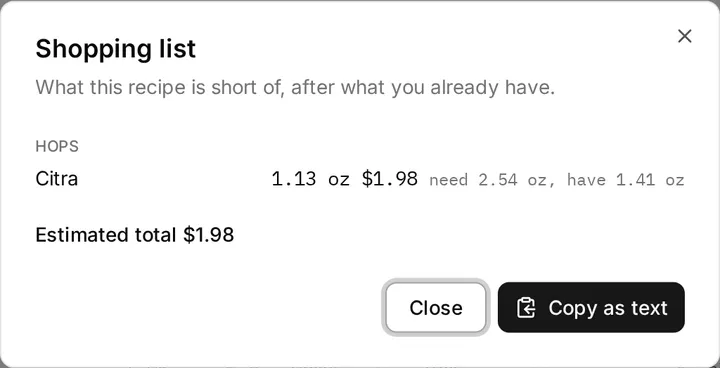
Section titled “The shopping list”Shopping list… in the recipe’s overflow menu is the difference between what the recipe needs and what you have. Select several recipes on the recipes page and Shopping list in the bar along the bottom builds one combined list, against a shared pool of stock, so it can never promise the same 50 g sack to two recipes. Three beers that each want 30 g of Citra want 90 g and one trip.
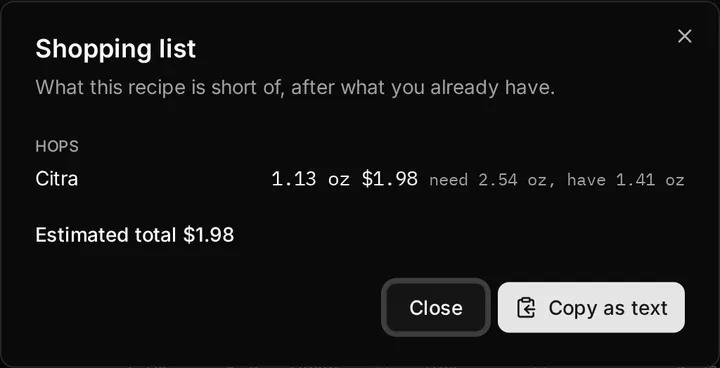
Each line shows the shortfall, what it will cost if you have a price for that ingredient, and the need-against-have behind it. Copy as text puts it on the clipboard as plain text, for a notes app, a message to whoever is passing the homebrew shop, or paper. Stock it on a line opens the add-to-inventory form already filled in with that ingredient and at least the shortfall, ready for when the bag comes home.
Costing
Section titled “Costing”If your lots carry prices, the recipe header shows a live estimate. It prices what you have at each lot’s own cost, oldest lot first, and prices what you are short of at the last price you paid for that ingredient, because “what will this cost at the shop” is what you last paid.
Brewing a batch freezes the cost at that moment, from the lots it actually consumed. Repricing a sack next month does not rewrite what last week’s beer cost you. If nothing in your cupboard has a price, no cost appears anywhere. An estimate of zero would be worse than silence.
Changing your currency in Settings changes the symbol and nothing else. The numbers on your lots are not converted.
Deducting on brew day
Section titled “Deducting on brew day”The Brew dialog offers a tick box, Deduct from inventory, off by default because a brewer logging last month’s batch would be surprised to find the cupboard emptied. Tick it and the batch’s ingredients come out of stock, oldest lot first, as one undoable step.
The batch page has an Inventory panel for the same thing later, and it shows exactly what will move before you press Deduct from inventory. It reads the batch’s frozen copy of the recipe, not the live one, so editing the recipe afterwards changes nothing about what was taken. A batch can only be deducted once, and the panel says so.
Where the cupboard is short, the lot is emptied and the panel says what was not covered, because that is what happened on brew day, and it leaves the cupboard accurate instead of showing forty grams of a hop that is gone.
Not brewing it after all? Return to stock on the same panel puts everything back where it came from, oldest lot and all, from the record the deduction kept. It exists because undo only reaches the press that is still in this session’s history, and a batch canceled a fortnight later needs a way back too. Deleting a batch offers the same return as a tick box, off each time, because deleting is also how you tidy a batch from 2023 that you did brew.
Related
Section titled “Related”- Ingredients, for the records behind each lot.
- Brew day and batches, for the deduction and the frozen cost.
- Yeast and pitching, for what a harvested lot’s viability means.
Something wrong on this page? Tell us.