
Your profile
A profile is optional. Beerwright works exactly the same without one, and most accounts will never claim one. It exists for a single purpose: so that a recipe you deliberately publish can carry your name instead of nobody’s.
Claiming a name
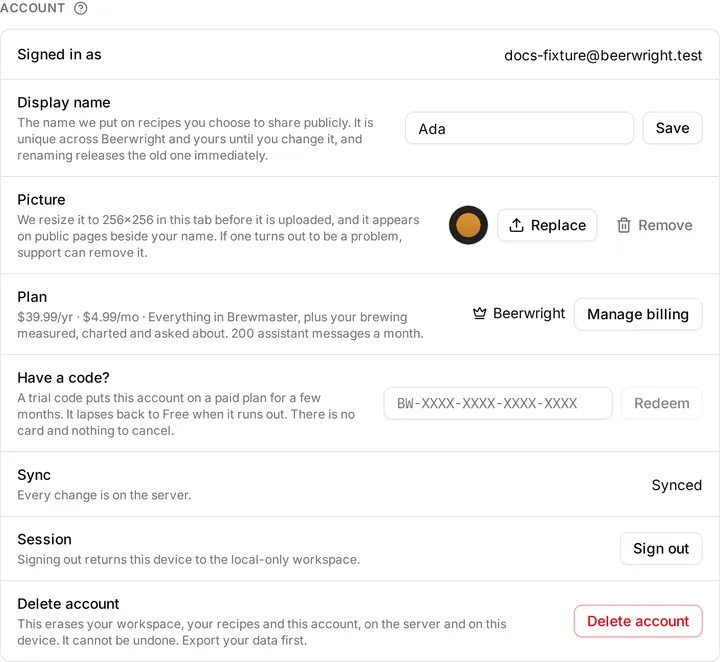
Section titled “Claiming a name”Settings → Profile → Display name. Type it, press Save.
- 3 to 30 characters, letters and numbers, with spaces, dots, underscores and hyphens allowed inside it. It has to start with a letter or a number.
- Letters and numbers means A–Z and 0–9. Accents and non-Latin scripts are not accepted yet. That is deliberate rather than an oversight: a display name sits next to other people’s, and characters that look identical to Latin ones are the easy way to pretend to be somebody else. It is a restriction we expect to relax.
- It is unique across all of Beerwright, and case does not create a second
identity — if somebody has
Hopsmith, thenhopsmithis taken too. - A handful of names are reserved (
admin,beerwright,supportand a few others), so that a byline cannot read as though we wrote it.
There is no “check if this is available” button. A name is claimed when you press Save, and somebody else can claim it in the moment between a check and the click, so a check would be a promise we could not keep. It also keeps anyone from using the form to find out which names are taken.
Changing it
Section titled “Changing it”Rename as often as you like. The change is immediate, no history is kept, and the old name is released the instant the new one is saved — anybody can take it from that moment. Anywhere your name is shown updates on its own; nothing stores a copy of it.
The picture
Section titled “The picture”Settings → Profile → Picture. Any image your browser can open.
It is resized to a 256×256 square in your browser before it is uploaded — the file itself never leaves your device. A photograph from a phone becomes a few kilobytes, so there is nothing to prepare and nothing to crop first; the center of the image becomes the square.
Without a picture, we draw your initials instead. There is no default avatar.
Your picture appears wherever your name does, which includes pages anybody can open. If one turns out to be a problem, support can remove it.
Where it appears
Section titled “Where it appears”On shared recipe pages you asked to put it on, and nowhere else.
When you share a recipe, the dialog offers Share with your name. Tick it and that link’s page carries your name and your picture; leave it and the page says nothing about who wrote the recipe. The choice belongs to the link, it is made before the link exists, and it cannot be changed afterwards — so nothing you have already sent to somebody can start naming you later.
And on your gallery listings. Publishing a recipe to the gallery lists it publicly under your name and your picture — that is what the gallery is, which is why publishing needs a display name at all.
Claiming a name publishes nothing on its own. A profile with no attributed links and no listings is visible only to you, in Settings.
Deleting it
Section titled “Deleting it”Deleting your account (Settings → Account → Delete account) removes the profile and the picture with everything else, and frees the name for somebody else. See Plans, billing and trial codes for what else that takes with it.
Related
Section titled “Related”- The gallery, where a profile is linked from.
- Sharing a recipe, for links that carry no profile at all.
- Settings, for the account behind it.
Something wrong on this page? Tell us.