
The recipe editor
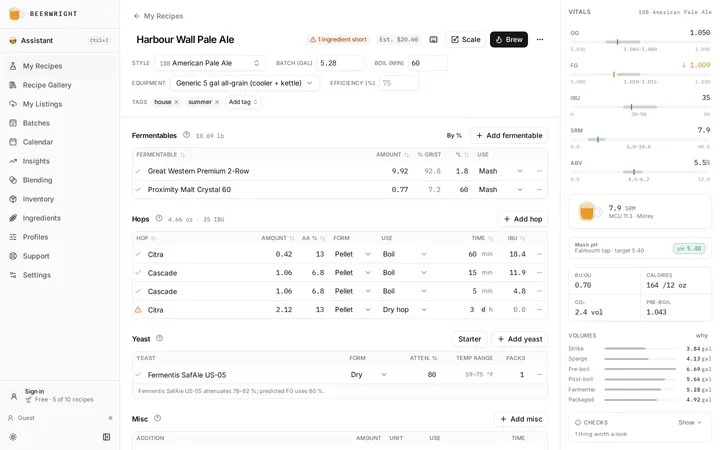
The editor is one scrolling column of panels with a vitals rail down the right. Everything updates as you type, on your own device, including the salts and the mash-pH model. Nothing waits on a server, which is why it still works with the wifi off.
Getting started has the quick tour. This is the long version.
The header
Section titled “The header”The recipe name is an inline field: type, then Enter to commit or Escape to revert.
Style sets the ranges the vitals rail draws against. Batch is the volume you are aiming for — by default what goes into the fermenter, not what ends up in the keg, though you can change which. Boil is the length in minutes, and it drives boil-off and hop utilization. Equipment picks the profile the volume maths runs on.
Efficiency is empty by default, and shows your profile’s mash efficiency grayed out behind it — leave it alone and the recipe follows your rig, so recalibrating the profile moves every recipe on it at once. Type a number to override it for this beer only, which is what you want for the ones you already know will run low: a big imperial stout, a grist that is 40 % wheat, a bill full of flaked adjuncts. Clear the field to go back to the profile. You never need a second equipment profile just to hold a different efficiency.
Tags sit here too. They exist to filter your recipe list, so they belong with Style rather than buried in the notes.
The overflow menu holds what you do to a recipe rather than in it: shopping list, brew sheet, version history, share, publish, duplicate, export, delete.
The ingredient panels
Section titled “The ingredient panels”Four panels, each with its own page.
- Fermentables: the grain bill, building by percentage, what a row’s class decides, and the two overrides worth knowing.
- Hops: additions and their uses, the alpha you correct from the bag, whirlpool timing, hop products, ageing a packet, and swapping a variety.
- Yeast and pitching: the attenuation the prediction uses, whether you have enough cells, and how a starter is sized.
- Misc: finings, nutrients, spices and the rest, and when each goes in.
Every row in every panel has a ⋯ menu with the same shape: view the catalog record, replace the ingredient in place, duplicate, move, remove. Replace with… keeps the amount and the timing and swaps only the ingredient, in one undoable change.
Acids are not in the misc list. Lactic, phosphoric and the rest live in the water panel, because that is where they reach the mash-pH prediction. Acidulated malt goes in the grist, and its acid is read off the malt.
Mash and fermentation schedules
Section titled “Mash and fermentation schedules”Water and mash pH
Section titled “Water and mash pH”See Water chemistry.
Packaging
Section titled “Packaging”Target carbonation in volumes of CO₂, and the priming sugar or keg pressure that gets you there, accounting for the CO₂ already in the beer from the fermentation schedule above it. Packaging and carbonation has the whole of it, including why a keg gets the full bottle dose.
Notes are prose, and they commit when you click away rather than on every keystroke, so undo works on thoughts rather than characters.
The vitals rail
Section titled “The vitals rail”Five bars — OG, FG, IBU, SRM and ABV — drawn against the BJCP range for your chosen style. When you are in range the bars sit quietly; when you drift out, you will see it.
Below them: the color swatch, a mash pH strip, the flavor wheels and the checks, then BU:GU, calories, CO₂ and pre-boil just above the volume waterfall from strike water to packaged beer.
Every headline number has an explain popover. It names the formula, shows the inputs that went into it, and gives you a link to ask the assistant about it. If a number ever looks wrong, open that first — it will usually tell you which input is the surprise.
On a phone the rail becomes a bar docked to the bottom that expands when you tap it.
Checks
Section titled “Checks”Under the waterfall, one line: All checks pass, or how many things are worth a look. Open it and we list them. We look at seven things, all from numbers the editor already has:
- the pre-boil volume against your kettle,
- the mash against your mash tun,
- the wort against your fermenter, and whether the krausen has anywhere to go,
- the predicted mash pH against 5.2–5.6, and whether anything is acidifying it,
- the pitch against the rate the strain wants, and whether a starter would fix it,
- your primary’s temperature against each yeast’s published range, which catches a schedule carried over from another recipe,
- OG, FG, IBU and color against the style you chose.
The last one is a note rather than a warning: brewing outside a guideline is a recipe, not a mistake. The three vessel checks need the capacities filled in on your equipment profile, and stay quiet until they are.
Press ⌘Z, or Ctrl+Z on Windows. Everything in the editor is a command, and one visible action is one undo step even when it writes several things at once — applying a mash profile replaces every step and takes one keypress to take back.
Related
Section titled “Related”- Your first recipe, the walk through this editor.
- Styles, for what the rail’s bars mean.
- Recipe history and versions, for the overflow menu’s version history.
- Keyboard shortcuts.
Something wrong on this page? Tell us.