
Import recipes from other brewing software
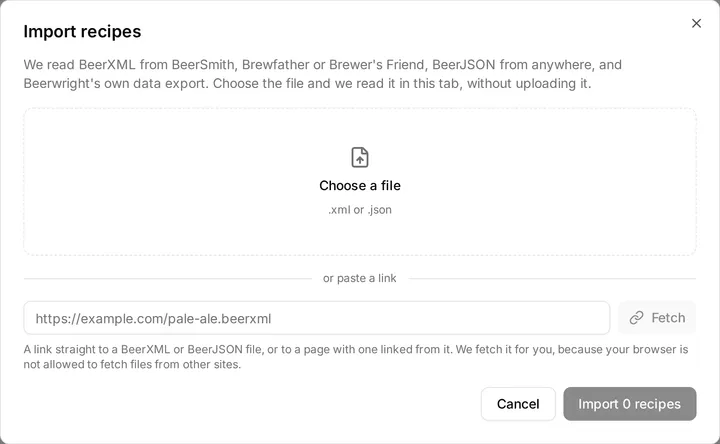
Press Import on the Recipes page. We accept four kinds of file, and we decide the format by looking inside the file rather than at its extension:
- BeerXML — what BeerSmith, Brewfather and Brewer’s Friend all export
- BeerJSON — the newer format, from anywhere
- BSMX — BeerSmith’s own file, the one already sitting in your library
- A Beerwright data export — your own workspace export
Nothing leaves your browser. We read a two-hundred-recipe file, parse it, match it against the ingredient catalog and fully cost it without a byte leaving the tab.
What happens, in order
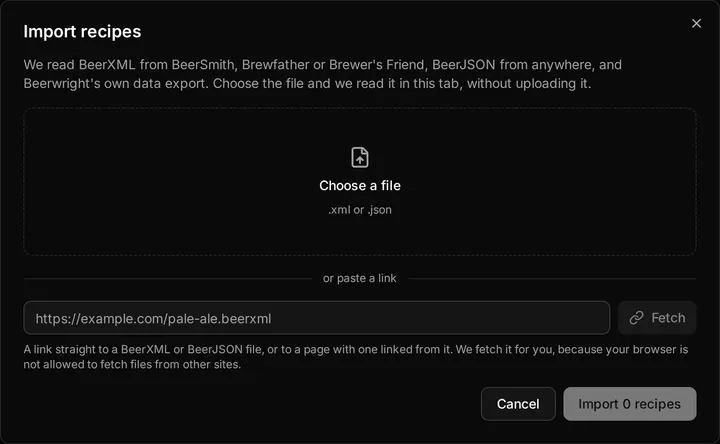
Section titled “What happens, in order”- Choose a file. A picker, not a drop zone.
- Preview. Every recipe in the file, pre-ticked and individually
toggleable, with its vitals computed by Beerwright’s own engine shown
alongside what the file claimed —
1.062next to(file: 1.060). A difference there is not a bug; it usually means the two tools disagree about IBU model or efficiency, and the preview is not allowed to quote the file’s numbers back at you for a better first impression. - Confirm. Each selected recipe arrives as one action, so ⌘Z undoes one recipe. The first one opens.
Beside each recipe the preview says how the ingredients landed — “8 matched”, “2 custom” — and a collapsed panel lists any notes and warnings.
If the file is malformed you get the parser’s own message, with the line and column, and nothing is imported.
The rule that decides every field
Section titled “The rule that decides every field”A catalog match supplies identity and unpublished chemistry. The file supplies every number it stated.
So if your BeerXML says Maris Otter at 37 PPG and 3 °L, you get Maris Otter at 37 PPG and 3 °L — your numbers, not the catalog’s. The catalog fills in only what the file could not say.
There is exactly one exception, and it is the reason matching matters at all: mash-pH chemistry. Distilled-water pH, buffering capacity and malt class cannot be expressed in either format. A catalog match is the only way to get them, and a miss leaves them empty rather than inventing a plausible number.
Ingredient matching
Section titled “Ingredient matching”We match names by token similarity against the catalog: accent-folded,
plurals stemmed, noise words like malt, pellet and hops dropped, region
qualifiers ignored, and the spellings the trade uses interchangeably folded
together, so Pils, Pilsen and Pilsner are one word and so are Caramel
and Crystal. Yeast product codes (US-05, WLP001) match outright.
A maltster’s name inside a product name counts as the maltster. Files written by BeerSmith and Brewfather put it at the front, “CNC Pils”, or in trailing parentheses, “Honey Malt (Gambrinus)”, and either way we read it as the maker and match only that maker’s products. That is also why “Rahr Vienna” comes across as a custom ingredient rather than another maltster’s Vienna: Rahr makes no Vienna malt, and a confident wrong match is worse than an honest miss.
Two things stop a match dead:
- A family or form disagreement. A sugar never matches a grain; a dry yeast never matches a liquid strain.
- A number disagreement.
Crystal Malt - 20Lscores zero againstCrystal 60. Names that differ only in a number are different ingredients, and a 40 °L color error is a visibly wrong beer.
A miss is an ordinary outcome, not a failure. The ingredient is built from the file’s own values and calculates identically; it is simply marked as custom, and the import notes say so.
What is inferred, and why
Section titled “What is inferred, and why”BeerXML is a 2008 format and the tools that write it disagree. Where Beerwright has to make a judgment, it makes it and then tells you in the import notes.
| The file says | Beerwright reads it as | Why |
|---|---|---|
USE=Aroma |
A whirlpool addition, with the stated time as the stand | The alternative — a zero-minute boil addition — throws away every IBU a modern hoppy recipe gets from its whirlpool |
RECOMMEND_MASH=FALSE on a base malt |
Ignored; the recipe’s own type decides mash or steep | BeerSmith writes this on base malts. Honoring it costs an all-grain recipe a third of its gravity |
| A dry-hop time over 60 | Minutes | BeerSmith writes minutes |
| A dry-hop time of 60 or less | Days | Brewfather writes days |
| A yeast amount by weight | 11.5 g sachets | |
| A yeast amount of 0.5–10 L | Packs | |
| Any other yeast volume | 35 mL vials | |
| A style category number | Used only if the file names the 2021 guidelines | 2008’s 8B is Special Bitter; 2021’s 8B is Schwarzbier. A number from the wrong edition is worse than no style |
Where the file says nothing at all, we use a documented default and say so: 66 °C for 60 minutes if there is no mash step, 20 °C for 14 days if there is no fermentation schedule, 18.927 L (5 US gal) if there is no batch size, 60 minutes of boil, 75 % attenuation, 2.4 volumes of CO₂.
Values that are merely out of range are pulled back to the nearest sensible one, and we tell you. Values that are impossible, like 250 % attenuation or pH 14, are ignored rather than nudged into a lie.
What is dropped
Section titled “What is dropped”- Every
DISPLAY_*field. Beerwright never reads one; the numeric field beside it is the truth. - Tasting notes and ratings, the file’s own style ranges, priming and keg fields, and unknown vendor tags.
- Per-ingredient notes. The recipe’s notes survive, prefixed with the brewer’s name where the file gave one.
- BeerJSON’s equipment block.
- A unit nobody recognizes. This is the important one: an unrecognized unit reads as “not stated”, never as the bare number with the unit ignored. A gravity in Plato or Brix is refused at the boundary for the same reason.
There is also a per-recipe ceiling — 64 fermentables, 64 hops, 64 miscellaneous items, 16 yeasts, 16 mash steps, 16 fermentation steps.
Brewfather, BeerSmith and Brewer’s Friend
Section titled “Brewfather, BeerSmith and Brewer’s Friend”There is no Brewfather integration, no account linking and no API. Those tools are supported through the files they export, and the quirks named in the table above are exactly the quirks their exports have. Each has a page of its own saying where the export lives and what to expect from it: Brewfather, BeerSmith and Brewer’s Friend.
What gets frozen at import
Section titled “What gets frozen at import”Your recipes must not change when the ingredient catalog is updated. So when an ingredient matches, Beerwright copies the figures it calculates with — yield, color, moisture, alpha acid, attenuation, the mash-pH chemistry — into the recipe document itself.
Each item also records where it came from: which catalog entry it matched, and the catalog version at the time. That is a note about the item’s history and nothing more, and it is never used to look a value up again. A recipe you import today will calculate the same way in a year, whatever has changed in the catalog since.
What is not kept is the original file. Beerwright does not store the bytes you imported, and there is no “view original” anywhere. The parsed recipe is the record.
The vitals the file claimed are shown in the preview and then discarded — they are never used in a calculation and never written into the recipe.
Exporting
Section titled “Exporting”Three ways out:
- A single recipe — the recipe’s overflow menu, Export as BeerJSON. The computed vitals are written into the file.
- A selection — tick the recipes on the list, then Export in the bar
along the bottom. BeerJSON’s root is a list, so they travel as one file,
beerwright-N-recipes-YYYY-MM-DD.beerjson.json, each with its own vitals. A selection of one is the single export. - Everything — Settings, Export all data, giving
beerwright-workspace-YYYY-MM-DD.jsonwith recipes, equipment profiles, water profiles and settings.
There is no BeerXML export. We read BeerXML but do not write it; BeerJSON is the format we export.
A Beerwright BeerJSON export carries an extension block with the ingredient snapshots, the provenance stamps and the water section, so re-importing your own export restores the recipe exactly. Other programs ignore that block and read the standard BeerJSON around it.
Importing a workspace export brings in recipes only — equipment profiles, water profiles and settings are in the file but this path does not read them, and the import notes say so.
Importing more than your plan allows
Section titled “Importing more than your plan allows”The dialog knows your recipe count and warns before you start:
Your plan has room for 3 more recipes. Importing more than that will import the first 3 and leave the rest — deselect some, or upgrade first.
It does not block you, though. The server enforces the cap as each recipe is applied, so the first few land and we decline the rest. See Plans, billing and trial codes.
Related
Section titled “Related”- From Brewfather, from BeerSmith and from Brewer’s Friend.
- Ingredients, for how an imported ingredient is matched to the catalog.
- Profiles, for the equipment an imported recipe lands on.
Something wrong on this page? Tell us.