
Anything that can post JSON
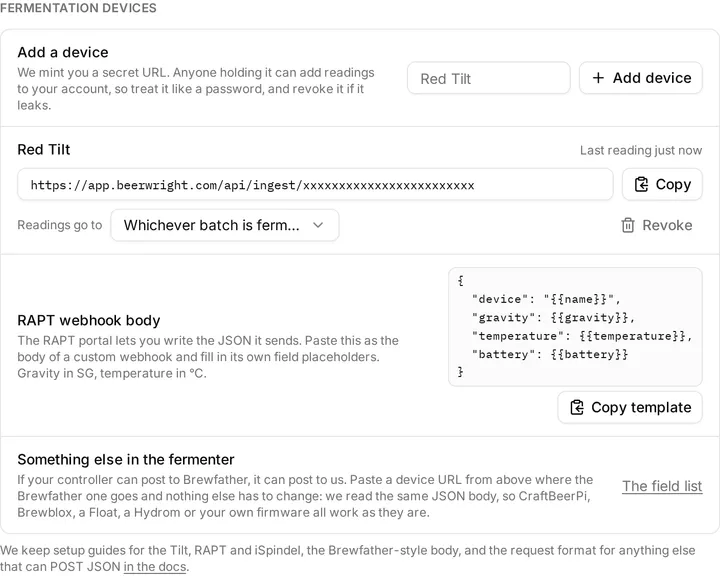
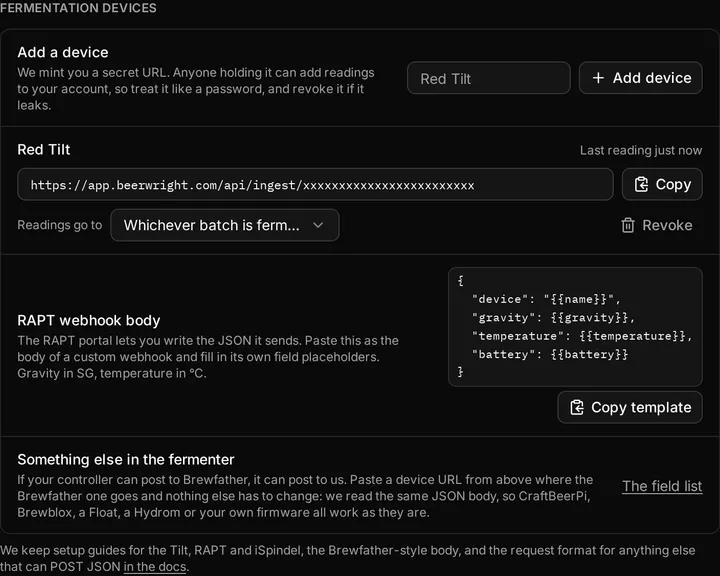
You do not need one of the named devices. A device URL is an ordinary HTTP endpoint, so a shell script, a controller like BrewPi or CraftBeerPi, a Node-RED flow, Home Assistant, or your own firmware can send readings straight to it.
The request
Section titled “The request”Send an HTTP POST to the device URL with a JSON body:
curl -X POST "https://app.beerwright.com/api/ingest/YOUR-TOKEN" \ -H "Content-Type: application/json" \ -d '{"device": "Fermenter 1", "gravity": 1.048, "temperature": 19.4}'The body
Section titled “The body”{ "device": "Fermenter 1", "gravity": 1.048, "temperature": 19.4, "battery": 3.9}gravityis specific gravity;sgis accepted as an alias. Values outside 0.980 to 1.200 are treated as a sensor fault and charted as a gap.temperatureis in °C;tempandtempCare accepted. A value of 40 or more is read as Fahrenheit unless the body says otherwise; send"temp_units": "C"(orF, orK) to be explicit. Values outside −10 to 60 °C chart as a gap.deviceis an optional name, stored with the reading;nameanddeviceNameare accepted.batteryis optional, in volts.
At least one of gravity or temperature must be a number. Numbers sent as strings are read fine. The body must be under 8 KiB.
There is no timestamp field: we stamp each reading when it arrives, so you cannot backdate one. Post it when you take it.
The Tilt app’s and the iSpindel’s native bodies are also recognized as themselves, which is how those devices work with no adapter on your side.
Already set up for Brewfather? Paste our URL over theirs
Section titled “Already set up for Brewfather? Paste our URL over theirs”If your controller has a Brewfather URL box, put a Beerwright device URL in it and you are done. We read Brewfather’s custom-stream body as it stands, field for field, so nothing on your device has to change. That covers CraftBeerPi, Brewblox, Hydrom and most homemade builds, because they all wrote their firmware against that one documented shape, and it is how a Fermentrack, a GravityMon on its Brewfather template and a TiltBridge reach us. A BrewPiLess sends a different body, also Brewfather’s, and we read that one too. Home Assistant, Node-RED and anything else that can be told to POST can send the body below.
{ "name": "Fermenter 1", "temp": 20.32, "temp_unit": "C", "gravity": 1.042, "gravity_unit": "G", "battery": 4.98}nameis the device’s name, stored with the reading.tempis the temperature, in whatevertemp_unitsays.temp_unitisC,ForK, and defaults toC. Note the singular: an iSpindel’s field istemp_units, and we read that one too.gravityis in whatevergravity_unitsays.gravity_unitisGfor specific gravity orPfor Plato, and defaults toG. SendPand we convert.batteryis optional, in volts.
The same plausibility bounds apply, and everything else in that body we accept and ignore: pressure, pH, bubbles per minute, auxiliary temperatures, comments, the beer name, the angle, the signal strength, and the target and hysteresis fields a controller sends about itself. We chart gravity and temperature, so those are the two we store. Sending the rest costs nothing and breaks nothing.
Plaato Airlock has no URL box of its own. It talks to Plaato’s cloud, which has been discontinued along with the device. If you run one of the community relays that reads an Airlock and posts on its behalf, point the relay at a device URL and the body above is what it will send.
What comes back
Section titled “What comes back”Once your URL is recognized, you always get an HTTP 200 back. That is deliberate: you never have to teach your firmware to retry, back off or buffer. Read the body to find out what happened.
| Body | Meaning |
|---|---|
{"ok": true, "stored": true, "batchId": "…"} |
Written. batchId is null when no batch was fermenting; the reading is kept under Unclaimed readings. |
{"ok": true, "stored": true, "ignored": ["sg"]} |
Written, but the named fields were out of range and will chart as a gap. |
{"ok": true, "stored": false, "duplicate": true} |
Refused as too soon. One reading per device per minute is accepted; the rest are dropped, not queued. |
{"ok": false, "error": "unrecognised"} |
The JSON carried nothing readable as a reading. Nothing was written. |
The one exception is a 404, which means the URL is wrong or has been revoked. Nothing you do will change that, so stop posting and check the URL in Settings.
Related
Section titled “Related”- Fermentation devices, for where readings land.
- Tilt, RAPT Pill, iSpindel, GravityMon, BrewPiLess, Fermentrack.
Something wrong on this page? Tell us.