
Support
In the app
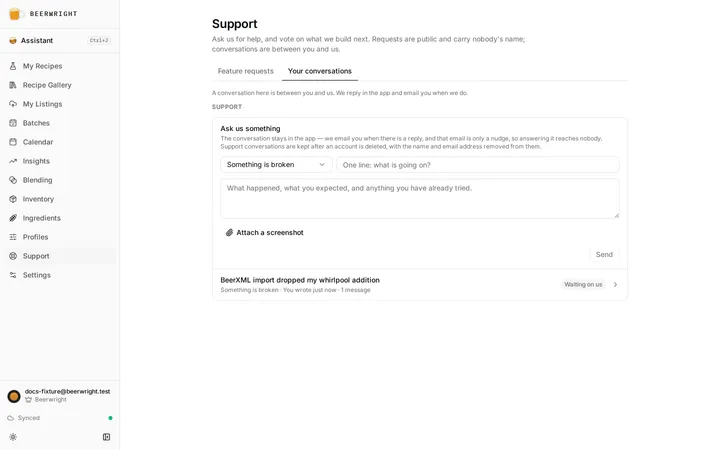
Section titled “In the app”The Support page, at /support, has two
tabs. Feature requests is the public board: if you want us to build
something, that is where it goes, and other brewers can vote for it. See The
feature-request board. Your conversations is this
section — a private thread between you and us, for everything else. (Old
/settings#support links still work; they land you on your conversations.)
On Your conversations, pick what it is about, write a line and a message, and send. The reply arrives in the same place — the thread is the conversation, both sides can add to it, and you can close it when you are done (replying to a closed one opens it again).
You are emailed when there is a reply, but that mail is only a nudge: it carries a link and nothing that was written. Replying to it reaches nobody.
Five conversations can be open at once, which clears itself as you close them.
Screenshots
Section titled “Screenshots”Attach up to three images per message, on the first message or on any reply. 8 MB each, and PNG, JPEG or WebP — which is whatever your screenshot key produces on any operating system. Nothing is resized on the way in, so the text in the picture stays readable.
They are private: only you and Beerwright support can open them. They are not public, they are not on the gallery, and no link to one works for anybody else.
An account can hold 50 MB of attachments in total across all its conversations. At that point the message still sends — only the image is refused.
Deleting your account deletes your screenshots. The conversations themselves are kept with your name and email address removed from them (a support thread is often about a refund or something we promised, and that has to stay true), but nothing in a screenshot is a record of that, so the pictures go.
If you cannot sign in — which is the one thing the in-app section cannot help with — the address below still reaches us.
One address, and one person reads it. There is no ticket queue to be routed through and no bot in front of it.
That covers all of it: a bug, a billing or refund question, a privacy request, or a security disclosure. If what you have is something you would like us to build, put it on the feature-request board instead — it is public, other brewers can vote for it, and that is what decides what we do next.
What to include
Section titled “What to include”Nothing formal, and it is the same either way you write. But these save a round trip:
- A bug — what you did, what happened, and what you expected instead. The recipe name helps; a screenshot of the vitals rail helps more, and in the app you can attach it.
- A number that looks wrong — open the explain popover behind it (every headline figure in the vitals rail has one) and say what it reported. It names the formula that produced the number, which usually resolves the question immediately. The FAQ may resolve it before you write at all.
- A billing question — email from the address on the account, or say which address it is. A Paddle receipt number helps but is not required.
- A refund — say what you want refunded. The refunds policy is the shorter read.
Things you can answer yourself
Section titled “Things you can answer yourself”- Your subscription, card, invoices or canceling — Settings → Account → Plan → Manage billing opens Paddle’s portal, which owns all of that. See Plans, billing and trial codes.
- “Why is my FG so high?” and questions of that shape — the assistant reads your actual recipe and runs the actual engine. ⌘J.
- “Where did my recipes go?” — check the sync indicator in the sidebar first. Guest means the workspace on this device is not the one on your account. Offline explains all five states.
Related
Section titled “Related”- The feature-request board, for asking us to build something.
- FAQ, for the questions that come up most.
- Glossary, for a word one of these pages used without explaining.
Something wrong on this page? Tell us.