
TiltBridge
A TiltBridge is a small ESP32 box that sits near your fermenters, hears every Tilt in Bluetooth range, and posts what it hears to the internet over Wi-Fi. No phone, nothing to keep awake, and nothing to carry into the room. One TiltBridge can carry several Tilts to Beerwright, and each color ends up on its own beer.
Setting it up
Section titled “Setting it up”- In Beerwright, open Settings → Fermentation devices, press Add a device, and copy the device URL.
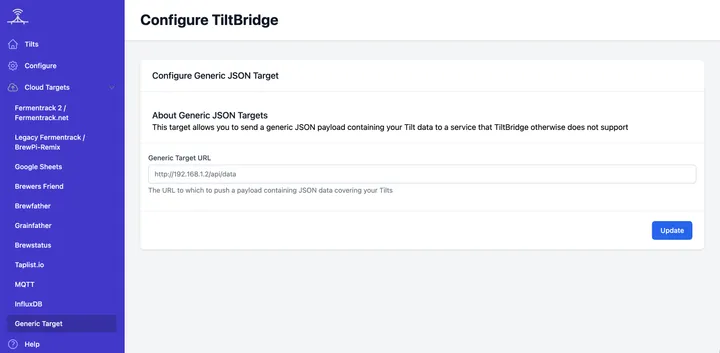
- Open your TiltBridge’s web interface on your own network, and under Cloud Targets in the sidebar choose Generic Target.
- Paste the whole device URL into Generic Target URL,
https://and all, and press Update.
Use that entry and not the others in the list. The Brewfather entry asks only for a key, because its address is fixed to Brewfather and cannot be pointed anywhere else, so a Beerwright key alone reaches nothing. The two Fermentrack entries speak Fermentrack’s own shape, nested by color and meant for software on your own network; we do not read it and you do not need it.
Once it is saved, the bridge posts about every ten minutes, one reading per Tilt it can hear. The first one usually lands within a minute or so, and the device list in Settings tells you when each device last reported, which is the quickest way to know the URL went in correctly.
Several Tilts
Section titled “Several Tilts”The first Tilt the bridge reports arrives as the device you added, and its readings go where that device’s setting says.
The moment a second color is heard, we stop guessing. The URL becomes a bridge, and each color becomes a device of its own in Settings, under the URL, with its own pin, its own name and its own revoke. The bridge itself keeps the URL and loses the pin, because a bridge is not in a fermenter, and pinning it to a beer would be filing two hydrometers on one chart.
A color you have not pinned yet does not guess either. Its readings are kept, unassigned, until you say which beer it is in, and the row says so rather than leaving you wondering whether anything arrived. When you do pin it — with Readings go to in Settings, or with the button the batch page offers when it sees colors reporting and pinned to nothing — the readings that color already took since the beer started fermenting come with it. Anything older stays where it is, because that belongs to whatever the Tilt was in before.
Revoking one color silences that one. Revoking the bridge turns the URL off, and everything reporting through it goes quiet at the same time.
What we read
Section titled “What we read”The Generic Target posts a Brewfather-style body, one per Tilt:
{ "name": "Red", "temp": "68.5", "temp_unit": "F", "gravity": "1.0512", "gravity_unit": "G", "device_source": "TiltBridge"}The numbers arrive as text and we read them as numbers, so nothing is lost
to the quotation marks. name is the Tilt’s color, which is what tells
your hydrometers apart and what each device is called in Settings.
Temperature comes in Fahrenheit, which the bridge says in temp_unit, and
we convert it. If your TiltBridge is set to report gravity in Plato it
says "gravity_unit": "P", and we convert that too rather than charting a
nonsense number.
A gravity outside 0.980 to 1.200 or a temperature outside −10 to 60 °C is treated as a sensor fault and charted as a gap, which is usually a Tilt reading through a thick krausen or resting against the fermenter wall.
Related
Section titled “Related”- Tilt, for the phone app and TILTpi route to the same chart.
- Fermentation devices, for where readings land and fixing the wrong batch.
- Switching from Brewfather, if your bridge is pointed there today.
Something wrong on this page? Tell us.